
Why Use Temp Mail for TikTok? Keeping Your Inbox Clean
Nobody loves spam messages. When you sign up for a new social media platform or download an app, your main email inbox suddenly becomes a warzone of newsletters, promotions, and marketing mail. TikTok is an awesome social media platform for entertainment. But creating an account with your real email still means handing over your personal information.
This is where a free temporary email address becomes your digital superhero. It lets you register for services like TikTok, Facebook, Instagram, Twitter, or other social media platforms without exposing your main email address. Think of it as a burner phone for your inbox. You use it just long enough for verification, then you toss it. It is a smart way to keep your digital life tidy.
Best Temp Mail: The Privacy Shield You Need
You might be thinking, What exactly is a temporary email? It’s a disposable email address. It is also often called a "throwaway" or "burner email. We provide the best temp mail services, and let you generate an address instantly. No registration is needed. You receive emails, but only for a very short time ( 48 Hours).
For Sing-up an app like TikTok, this is perfect. TikTok needs an email to send a verification code. Once you use that code, the temporary email's job is done. It helps you keep your privacy secure. You prevent unwanted mail from cluttering your everyday inbox.
Avoid Spam: Your real email stays safe from marketing lists.
Boost Anonymity: You register without using a personal identifier.
Quick and Easy: Creating an account is super fast.
No Long-Term Commitment: The address self-destructs after a set time.
This approach offers convenience without the future headache of excessive digital mail. It is a simple tool for serious privacy.
The Risk of Using Your Main Email
Let’s talk about a real-life scenario. Imagine you use your main email address for TikTok sing-up. This is the same email you use for bank, work, or important family contacts.
What happens if TikTok experiences a data breach? Your primary email address is suddenly out there. Scammers might use it for phishing attempts. You could face a flood of spam. It's a huge privacy risk, honestly.
Using a free temporary email creates a firewall. That disposable address might get compromised, but who cares? It holds no important information. It isn't connected to your sensitive accounts. This single step seriously boosts your account security. You shield your digital identity from bad actors.
Step-by-Step Guide: Creating Your TikTok Account
Creating a TikTok account with a disposable temporary email is pretty simple. You only need a couple of minutes. Follow these simple steps for a secure sign-up process.
Step 1: Get Your Free Temporary Email Address
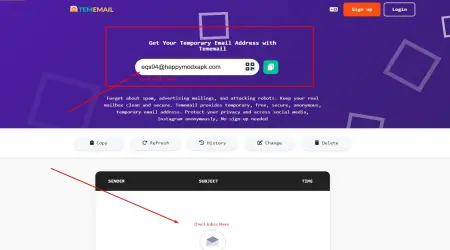
First, open a reputable Best Temp Mail website in your browser. Services like TemEmail.org or Internxt offer this for free. They generate a new, random address for you instantly.

Action: Copy this newly generated email address. Keep the temp mail tab open! You need it for the next step.
Step 2: Start the TikTok Sign-Up Process
Now, open the TikTok app or website. Tap on the "Sign Up" button. You will choose to sign up using a "Phone or email."
Select the email option.
Enter your birthdate.
Step 3: Paste Your Free Temporary Email
Paste the temporary email address you copied in Step 1 into the email field on TikTok. Create a strong, unique password for your new TikTok account. Do not use this password anywhere else.

Action: TikTok will now send a verification code to that address.
Step 4: Retrieve and Enter the Code
Switch back to the open tab with your TemEmail.org inbox. The verification email from TikTok should appear almost immediately.
Find the six-digit verification code inside the email.
Copy this code right away.
Switch back to the TikTok sign-up screen. Paste the code into the verification field. Hit “Next.”
Step 5: Finalize Your TikTok Account
TikTok may ask you for a username or nickname. Pick one you like! Your account is now active. You successfully created an account without using your personal email.
Tips: Remember that the temporary email inbox will expire soon. You should note down your TikTok username and password immediately. You will need these details later to log in. You won't be able to retrieve a forgotten password using that temporary email address later.
Choosing the Best Temp Mail Service
Not all disposable email providers are equal. Some are very unreliable. TikTok might even block addresses from known bad providers. How do you choose a good one?
Look for these key features when selecting a free temporary email service:
Instant Generation: The service should create an address immediately.
Fast Delivery: Verification emails need to arrive quickly.
Domain Rotation: Good services frequently change their domain names. This helps them avoid blacklists by social platforms.
Clear Expiration: You should know how long the inbox will last.
Choosing a quality Best Temp Mail service ensures a smooth sign-up experience. It prevents frustrating failures when you just need that one verification code.
Final Thoughts
Using a free temporary email for TikTok sing-up is a brilliant move. It is a quick and effective way to avoide spam. It protects your real information from unnecessary exposure. You get to enjoy the platform while keeping your main inbox clean.